
 大眼蛙
大眼蛙


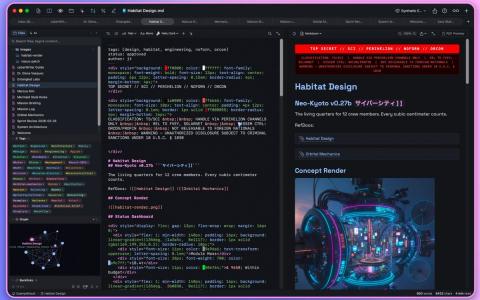
cyberWriter for Mac 是一款专为Mac用户设计的原生Markdown编辑器,专注于提供流畅、高效的写作环境。它将Markdown、HTML、CSS和Mermaid图表无缝转化为专业的PDF、Word文档和HTML输出,配备实时预览功能、AI智能工作区以及文件保险库支持。无论你是撰写技术文档、管理个人知识库,还是创作包含复杂公式和图表的报告,cyberWriter都能满足需求。它完全基于SwiftUI开发,无需安装Pandoc或LaTeX等外部工具,确保数据安全和本地化运行。支持Apple Intelligence和各种本地或云端AI模型,让写作过程更智能便捷。
主要功能
1. 原生Markdown编辑支持GitHub Flavored Markdown,包括表格、任务列表、删除线等,配备语法高亮、实时预览和滚动同步。
2. AI工作区集成Apple Intelligence或自定义模型,支持与整个保险库上下文聊天、快速操作如总结改写,以及流式输出到编辑器。
3. 文件保险库与知识图谱,打开Markdown文件夹即可创建互联笔记,支持Wikilinks、反向链接、标签和交互式3D图谱。
4. LaTeX公式和Mermaid图表原生渲染,支持16种图表类型,实时预览并完美导出到PDF、Word和HTML。
5. 高级导出与主题自定义,提供实时PDF预览、文档地图、多种预览主题和自定义CSS,支持页面设置和媒体嵌入。
6. 专注模式、语音笔记、命令面板和颜色拾取器等工具,提升写作效率和文档美观度。
cyberWriter 3.8 更新内容:
更新日期:2026年7月7日
- Light Mode, refined - A full appearance system: System Light, System Dark, the original Cyber, and the new pure-black Blackout. Every accent, border, and panel tuned to be crisp in each.
- Knowledge Graph, reimagined - Your vault as a living globe and other 3D projections. Tag clustering, tag-colored nodes, search that lights up matching notes, selectable layouts, a guided tour mode, and Vault Stats at a glance.
- Snippets - A built-in snippet manager: capture from any document, organize in folders, pin favorites, and drop snippets anywhere with the new shade (⌘⌥S).
- Voice, upgraded - Pick your input device, watch a live waveform, and see words stream into the editor as you speak — dictation and AI insertions now anchor cleanly without disturbing your cursor.
- Faster everywhere - Large documents open and render dramatically faster. Theme switching is instant. Tab switching is smoother. The graph pauses when the app is in the background, so cyberWriter sips power instead of gulping it.
- Plus - Native undo with correct caret behavior, smooth sidebar animations, polished first-launch experience, and dozens of fixes from our wonderful, bug-hunting users.
cyberWriter 3.995 更新内容:
更新日期:2026年9月11日
- 连接人工智能服务时无需再查找其地址:添加连接时会先列出人们实际使用的服务,包括 OpenAI、Claude、OpenRouter、DeepSeek、Groq、Mistral 和 GLM。点选其中一项即可自动填入其应用程序接口地址和起始模型;密钥按钮会打开该服务的密钥页面,获取密钥只需一次点击,而不必再去搜索。
- 支持 TOML 格式的前置元数据:以 +++ 代码块开头的笔记(雨果和佐拉所使用的形式)现已可像其他笔记一样被读取。该代码块不会出现在笔记正文中,其字段可在属性面板中编辑,编辑后会写回 TOML,而不会把文件转换成 YAML。
- GLOW 可补全笔记名称:在保险库终端中,Tab 键现在不仅能补全路径,也能补全 @笔记 引用,包括带空格的名称。将笔记附加到人工智能对话轮次时,不再需要精确输入全名。
- 此外还包括各项修复与整体打磨。


 2507222545
全部评论 0
暂无跟帖